ASUS ROG Ryujin III 240mm Review (2026): A Spec-Based Look
As an Amazon Associate we earn from qualifying purchases. Links on this page are affiliate links.
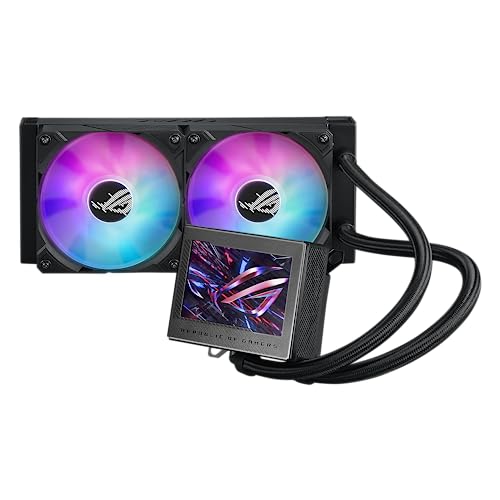
This asus rog ryujin iii 240mm review examines a distinct cooling solution that combines a 240mm radiator with a unique integrated display. The unit features a 3.5-inch LCD screen for real-time hardware monitoring or custom animations. It relies on an 8th generation Asetek pump and two magnetic daisy-chainable fans with ARGB lighting. The design embeds one fan directly into the pump block to help manage VRM temperatures. We will break down how these specific components work together to deliver cooling performance and aesthetic customization for your build.
What stands out
- 3.5-inch LCD screen supports custom GIF animations with doubled file volume capacity
- 8th generation Asetek pump uses a 3-phase motor for improved flow and reduced noise
- Embedded fan features a ring-shaped frame to reduce heat around the VRM area
- Premium ARGB fans are magnetic and daisy-chainable with Gen 2 LED technology
Who it fits
Good fit for
You should consider this cooler if you want a compact 240mm radiator setup that includes a prominent visual element. The integrated LCD screen is ideal for users who want to display system stats or personalized animations without needing extra software overhead. The embedded fan design also makes it a strong choice for builds where VRM cooling is a priority. If you value the convenience of magnetic fan connections and integrated pump control via Armoury Crate, this unit aligns well with your needs.
Who should skip it
You might want to look elsewhere if you prefer a traditional radiator setup without a display. This unit includes a 3.5-inch LCD screen, which adds bulk and complexity to the pump head. If you do not care about hardware monitoring on the cooler itself, you are paying for a feature you will not use. Additionally, the design integrates a fan into the pump block, which limits your flexibility in fan placement compared to standard 240mm radiators that offer two separate fan slots.
Verdict: The ASUS ROG Ryujin III 240 ARGB is a specialized cooler that merges 240mm cooling performance with a customizable 3.5-inch LCD display. It suits builders who want integrated VRM cooling and visual customization in a compact form factor.
ASUS ROG Ryujin III Key Specs
Radiator Size: 240mm
This size means the cooler uses two fans to dissipate heat. It fits most standard mid-tower and full-tower cases. You get a balance of cooling capacity and case compatibility. Larger radiators like 360mm offer more surface area for heat exchange. Smaller 120mm units save space but struggle with high-end CPUs. Choose 240mm if your case supports it and you want efficient cooling without taking up excessive room.
Display Size: 3.5"
A 3.5-inch LCD screen sits on the pump head. You can view system stats like CPU temperature or upload custom animations. This adds a visual element to your build. It lets you monitor key metrics at a glance. Other coolers may have smaller screens or none at all. This size is large enough to be readable but compact enough to fit on standard pump blocks.
Lighting Type: ARGB
Addressable RGB lighting allows each LED to be controlled individually. You can create complex patterns and color gradients. This is different from standard RGB, which lights all LEDs in one color. You can sync these lights with motherboard software for a unified look. It enhances the visual appeal of your system. Check your motherboard for an ARGB header to connect and control these effects effectively.
Pump: 8th gen Asetek
The 8th generation Asetek pump is known for reliability and performance. It delivers high flow rates to move coolant efficiently. This helps maintain lower CPU temperatures under load. It also aims to reduce noise compared to older versions. You get a proven cooling platform from a major manufacturer. This pump type is common in high-end AIOs. It suggests consistent performance over time without frequent maintenance or replacement.
Design and Build Quality
The ASUS ROG Ryujin III 240mm presents a distinct layout that merges a 240mm radiator with an integrated pump block. This design choice places the display directly on the water block rather than the fans. You get a 3.5-inch LCD screen for real-time hardware monitoring or custom animations. According to the listing, the display supports doubled file volumes for GIF uploads. This allows you to personalize your build’s visual identity without needing separate software overlays for static images.
The unit weighs 3.1 pounds. This weight reflects the robust internal components, including the 8th generation Asetek pump with a 3-phase motor. The pump delivers higher flow and lower impedance. You benefit from reduced noise and improved cooling efficiency. The pump is paired with two fans that feature a new ring-shaped frame design. These fans use advanced airflow channels to reduce heat around the VRM area. This specific airflow path helps protect nearby motherboard components from thermal stress.
Lighting is handled by premium ROG ARGB magnetic daisy-chainable fans with Gen 2 LED technology. You can customize the LED lighting effects to match your system’s theme. The entire unit, including pump, embedded fan, and radiator fan speeds, is controlled via Armoury Crate software. You get complete control over these settings. A free one-year AIDA 64 license is also provided for advanced system monitoring. This combination of hardware and software tools gives you precise oversight of your cooling performance.
Setup and everyday use
Installation begins with mounting the 240mm radiator to your case. You must secure the two fans to the radiator frame. The pump block attaches directly to your CPU socket. This unit weighs 3.1 pounds, so ensure your motherboard backplate can support the load without sagging.
Once hardware is secure, you connect the power cables. The fans use ARGB lighting. They are magnetic and daisy-chainable. This simplifies cable management. You connect the main chain to a single motherboard header. The pump connects to the CPU fan header for speed control.
For daily operation, you use the included software. Armoury Crate controls the pump speed and fan curves. It also manages the LED effects on the fans. You can upload custom GIFs to the 3.5-inch LCD screen. The screen displays system stats or animations. You can double the file volume for more content.
The Asetek 8th gen pump runs quietly. Its 3-phase motor reduces impedance. This means less noise during heavy loads. You also receive a one-year AIDA 64 license. This provides advanced monitoring data. You can view this data on the LCD. The setup is straightforward. The software integration handles the rest. You get immediate feedback on temperatures and speeds.
Before You Buy This Cooler
Before you buy, verify your case supports a 240mm radiator. Check that your motherboard has enough space for the pump block height and width. You need an available USB header for the LCD display and ARGB lighting. The included software, Armoury Crate, manages fan curves and pump speeds. You should also ensure your CPU socket is compatible with the mounting hardware. This cooler suits users who want real-time monitoring without adding extra sensors. It fits well if you prefer an integrated display over traditional fan-based indicators. Consider your cable management space, as the daisy-chain fans and display cable require routing. This option sits between basic coolers and high-end custom loops. It offers more features than standard AIOs but less flexibility than custom builds. Regularly check your fan connections and pump noise levels. Keep the area around the pump clear for airflow. This setup is ideal for those who value aesthetics and data visibility alongside cooling performance.
Check before you buy
- Verify case compatibility for a 240mm radiator.
- Check motherboard space for the pump block.
- Ensure an available USB header for the display.
- Confirm CPU socket support for mounting hardware.
The product at a glance
ASUS ROG Ryujin III 240mm LCD Cooler
Best for: Users wanting a 3.5-inch LCD display and quiet pump
- Radiator Size
- 240mm
- Display Size
- 3.5"
- Lighting Type
- ARGB
- Weight
- 3.1 pounds
View on Amazon: ASUS ROG Ryujin III 240mm LCD Cooler Affiliate link
The ASUS ROG Ryujin III 240mm is an all-in-one liquid cooler featuring a 3.5-inch LCD display and 240mm radiator. It uses an 8th gen Asetek pump with a 3-phase motor for improved flow and reduced noise. The unit includes ARGB fans with a ring-shaped frame to help manage VRM heat. You get software control via Armoury Crate and a free AIDA 64 license for monitoring.
Pros
- 3.5-inch LCD screen for hardware monitoring and custom GIFs
- 8th gen Asetek pump with 3-phase motor for lower noise
- ARGB fans with ring-shaped frame design
- Armoury Crate software for full control
Cons
- Heavier build at 3.1 pounds
- Requires Armoury Crate software for full functionality
- No remote control included
Good fit if
- You want a large LCD display for system stats
- You prefer quiet operation from an 8th gen Asetek pump
- You use Armoury Crate for PC management
Skip if
- You need a 360mm radiator size
- You want a lighter cooler under 3 pounds
- You prefer hardware-only control without software
Verdict: ASUS ROG Ryujin III 240mm LCD AIO suits users who value a prominent 3.5-inch display and quiet 8th gen Asetek pump performance. It fits those comfortable using Armoury Crate for customization.
Specifications side by side
| Spec | ASUS ROG Ryujin III 240mm LCD Cooler |
|---|---|
| Radiator Size | 240mm |
| Display Size | 3.5" |
| Lighting Type | ARGB |
| Lighting | ARGB |
| Display | LCD Screen |
| Weight | 3.1 pounds |
| Size | ARGB |
| Model | ROG RYUJIN III 240 ARGB |
Frequently asked questions
Does the ASUS ROG Ryujin III 240mm support RGB lighting?
Yes, this cooler includes ARGB lighting. You can customize the light effects using the included software. The lighting syncs with other compatible components on your motherboard. This allows for a unified aesthetic across your build. It adds visual flair without compromising the cooling performance of the unit.
What software controls the LCD display on this AIO?
You use Armoury Crate to manage the display. This software lets you upload custom images or select animations for the 3.5-inch screen. You can also monitor system temperatures through the interface. The app provides direct control over the pump speed and fan curves for optimal performance.
How heavy is the ASUS ROG Ryujin III 240mm?
The unit weighs 3.1 pounds. This weight includes the pump block, radiator, and fans. You must ensure your motherboard backplate and case can support this load. Proper mounting is essential to prevent stress on the CPU socket. The weight is distributed across the radiator frame and pump block.
Is the pump in this cooler quiet during operation?
The cooler features an 8th generation Asetek pump. This pump is designed for quiet performance. It balances flow rate with noise reduction. You get efficient cooling without excessive fan or pump noise. This makes it suitable for users who prioritize a silent system environment.
What size is the LCD screen on the pump block?
The pump block includes a 3.5-inch LCD screen. This display is prominent and sits directly on the water block. You can use it for real-time hardware monitoring or custom visuals. The size offers enough space for clear text and graphics. It serves as a focal point for your build.
Can I customize the animations on the LCD display?
Yes, you can upload custom animations. The display supports user-uploaded images and video loops. You control these uploads via Armoury Crate. This feature allows you to personalize your system. You can show system stats or play custom content on the 3.5-inch screen.
What type of lighting connectors does this cooler use?
The cooler uses ARGB connectors. You need an available USB header on your motherboard for the LCD display. The ARGB lighting connects to your motherboard for synchronization. This ensures the lights match the rest of your system. Check your motherboard manual for compatible headers before installation.