Best Water Cooling Parts for LGA 1700: 11 Spec-Based Picks
As an Amazon Associate we earn from qualifying purchases. Links on this page are affiliate links.
Finding the best water cooling parts for LGA 1700 requires matching your build needs to specific block features. We compared 11 options based strictly on published specifications to help you choose accurately. The Barrow ARGB CPU Water Block leads this list because it offers a clear acrylic top plate for users who want a transparent look. This guide helps you decide between simple flow-optimized designs, LCD monitoring, or ecosystem integration by comparing key specs like lighting, material, and display type.
Quick picks
The best fit for you
- You want a clear acrylic top plate Barrow ARGB CPU Water Block The Barrow LTYKB-AI model features a clear acrylic top for a transparent look.
- You need precise thermal control for multi-chip CPUs Corsair iCUE Link XC7 CPU Water Block The Corsair XC7 RGB Elite offers precise thermal management when paired with the System Hub.
- You prioritize LCD monitoring and USB-C integration Corsair XC7 RGB Elite LCD CPU Water Block The Corsair XC7 RGB Elite LCD model includes an LCD screen and USB-C connectivity.
- You want built-in temperature monitoring without external hardware Thermaltake Pacific SW1 CPU Water Block The Thermaltake Pacific SW1 Plus block includes a built-in sensor for real-time data.
- You want an integrated display and VRM cooling ASUS ROG Ryujin III White CPU Water Block The ASUS ROG Ryujin III WB White combines an LCD screen with VRM cooling.
Our 11 picks

Barrow ARGB CPU Water Block
Best for: users wanting a clear acrylic top plate
- Socket Compatibility
- LGA 1700 (what this guide is about)
- Lighting
- 5v 3Pin aRGB
- Material
- Acrylic, Nickel-plated Copper
This Barrow water block is built for Intel LGA 1700 sockets. It uses high-transparency acrylic and a copper nickel-plated mount. The design features high-density jet microchannels for heat transfer. You get ARGB lighting and an included ZBDZJX-5 adapter cable. It also supports older sockets like LGA 115x and 2011. You can choose between white or black styles.
Pros
- High-transparency acrylic top plate
- Copper nickel-plated cold plate
- ARGB lighting with included adapter
- Supports LGA 1700 and legacy sockets
Cons
- No integrated LCD display
- No temperature sensor included
- Acrylic material may scratch over time
Good fit if
- You want a simple, clear acrylic look
- You need support for LGA 1700 and older sockets
- You prefer a basic block without screens
Skip if
- You require an integrated LCD screen
- You need a built-in temperature sensor
- You want a fully metal top plate
Verdict: Barrow LGA 1700 ARGB Acrylic Block offers a clear acrylic top and solid copper base for LGA 1700 builds. It suits users who want a transparent look and do not need a display or sensor.

Barrow POM Intel CPU Water Block
Best for: simple flow-optimized cooling
- Socket Compatibility
- LGA 1700 (what this guide is about)
- Material
- POM
This Barrow water block supports LGA 1700 sockets and includes a ZBDZJX-5 adapter cable for installation. It features a jetting type micro waterway design to improve coolant flow over the CPU. The base is copper with a nickel-plated mount for durability. You get a choice of white or black POM tops. It is a solid option for builders prioritizing flow dynamics and basic compatibility without extra electronics.
Pros
- Jetting type micro waterway design
- Copper nickel plated mount
- Includes ZBDZJX-5 adapter cable
- Available in white or black POM tops
Cons
- No RGB lighting or addressable headers
- No integrated LCD screen or display
- No temperature sensor included
Good fit if
- You want a simple block with good flow design
- You prefer a clean look without RGB lights
- You already have the necessary adapter cable
Skip if
- You need RGB lighting effects
- You want an integrated display
- You require a built-in temperature sensor
Verdict: Barrow LTSE-04I LGA 1700 Block is a straightforward cooling solution for users who value micro waterway flow design over flashy features. It fits builders who want reliable performance without the bulk of screens or lights.

Corsair iCUE Link XC7 CPU Water Block
Best for: iCUE Link users needing precise thermal control
- Socket Compatibility
- AM5, LGA 1700 (what this guide is about)
- Lighting
- Addressable RGB
- Material
- Nickel-plated Copper
- Dimensions
- 3.4 × 3.07 × 1.42 inches
- Weight
- 5.6 ounces
The Corsair iCUE Link XC7 RGB Elite CPU Water Block uses a Hexa-Flow cooling engine to mitigate laminar flow and cool all CPU cores evenly. It features an ultra-fine nickel-plated copper cold plate with over 120 micro-cooling fins. A built-in temperature sensor allows precise control via the iCUE Link ecosystem. It supports Intel LGA 1700 and AMD AM5 sockets. The block includes 24 individually addressable RGB LEDs for visual customization.
Pros
- Hexa-Flow cooling engine for even core coverage
- Nickel-plated copper cold plate with 120+ micro-fins
- Built-in cold plate temperature sensor
- 24 individually addressable RGB LEDs
- Compatible with Intel LGA 1700 and AMD AM5
Cons
- Requires the iCUE Link System Hub for connectivity
- System Hub is sold separately
- Limited to RGB lighting without LCD display
Good fit if
- You use the iCUE Link ecosystem
- You want precise temperature monitoring
- You prefer even cooling across multi-chip CPUs
Skip if
- You do not have the iCUE Link System Hub
- You want an integrated LCD screen
- You need native support without extra hubs
Verdict: The Corsair iCUE Link XC7 RGB Elite is ideal for builders already invested in the iCUE Link ecosystem who need precise thermal control and even cooling for modern multi-chip processors. It delivers reliable performance for LGA 1700 systems when paired with the required System Hub.

Corsair iCUE Link XC7 RGB CPU Water Block
Best for: iCUE Link ecosystem users
- Socket Compatibility
- AM5, LGA 1700 (what this guide is about)
- Lighting
- Addressable RGB
- Material
- Nickel-plated Copper
- Dimensions
- 3.4 × 3.07 × 1.42 inches
- Weight
- 5.6 ounces
The Corsair XC7 RGB Elite uses a hexa-flow cooling engine to mitigate laminar flow across multi-chip package CPUs. Its nickel-plated copper cold plate features over 120 micro-cooling fins for efficient heat transfer. A built-in temperature sensor allows precise control via the iCUE Link ecosystem. The block includes 24 individually addressable RGB LEDs. It supports Intel LGA 1700 and AMD AM5 sockets for versatile compatibility.
Pros
- Hexa-flow cooling engine for even core cooling
- Nickel-plated copper cold plate with 120+ micro-fins
- Built-in cold plate temperature sensor
- 24 individually addressable RGB LEDs
Cons
- Requires iCUE Link System Hub for connectivity
- Hub is sold separately
- No LCD screen included
Good fit if
- You use Intel LGA 1700 or AMD AM5
- You already own the iCUE Link System Hub
- You want precise temperature-based cooling control
Skip if
- You do not have the iCUE Link System Hub
- You prefer a block with an integrated display
- You want a simpler plug-and-play connection
Verdict: Corsair XC7 RGB Elite LGA 1700 Block delivers robust cooling for multi-chip CPUs when paired with the required hub. It suits builders who already have the iCUE Link System Hub and want precise thermal management.

Corsair XC7 RGB Elite LCD CPU Water Block
Best for: LGA 1700 builds needing LCD monitoring
- Socket Compatibility
- AM5, LGA 1700 (what this guide is about)
- Lighting
- LCD, Addressable RGB
- Material
- Nickel-plated Copper
- Display
- LCD Screen
- Dimensions
- 3.4 × 3.1 × 1.4 inches
- Weight
- 7.68 ounces
This block features a 480x480 IPS LCD screen for real-time CPU monitoring and custom graphics. It uses a Hexa-Flow cooling engine with over 120 micro-cooling fins to ensure even heat distribution across LGA 1700 cores. You get 31 individually addressable RGB LEDs and USB-C connectivity for direct iCUE setup. It supports both Intel LGA 1700 and AMD AM5 sockets.
Pros
- 480x480 IPS LCD screen with 600cd/m² backlight
- Hexa-Flow cooling engine for even multi-chip cooling
- 31 individually addressable RGB LEDs
- USB-C connectivity for automatic iCUE setup
Cons
- Higher weight at 7.68 ounces compared to standard blocks
- Requires USB-C connection for display functionality
- No mention of included thermal paste quality
Good fit if
- You want real-time CPU data on a high-resolution screen
- You prefer USB-C connectivity for setup
- You need support for LGA 1700 and AM5
Skip if
- You want a lightweight block under 5 ounces
- You prefer a passive block without a display
- You do not use the iCUE ecosystem
Verdict: Corsair XC7 RGB Elite LCD delivers high-end monitoring and cooling for LGA 1700. It fits users who prioritize screen data and USB-C integration over minimal weight.

Thermaltake Pacific SW1 CPU Water Block
Best for: Users wanting built-in temp monitoring
- Socket Compatibility
- AM5, LGA 1700 (what this guide is about)
- Lighting
- RGB
- Material
- Nickel-plated copper
- Dimensions
- 10 × 2 × 2.7 inches
This Thermaltake block supports LGA 1700 and AM5 sockets. It features a copper base with nickel plating and an optimized 0.2 mm microfin structure. A built-in temperature sensor provides direct data. You can control the RGB lighting via the TT RGB Plus software. The unit measures 2 inches wide and 2.7 inches tall. It suits users who want integrated monitoring.
Pros
- Built-in temperature sensor for direct readings
- Copper base with anti-corrosive nickel plating
- 0.2 mm microfin internal structure for efficiency
- Supports LGA 1700 and AM5 sockets
- 16.8 million color RGB via TT RGB Plus
Cons
- Requires third-party TT RGB Plus software for lighting
- No display screen for local data viewing
- Limited to single 12V addressable LED header
Good fit if
- You want direct CPU temperature monitoring
- You use LGA 1700 or AM5 platforms
- You prefer copper nickel-plated bases
Skip if
- You need a built-in LCD screen
- You want native motherboard RGB control
- You require a larger cold plate
Verdict: Thermaltake Pacific SW1 Plus LGA 1700 Block offers reliable cooling with a built-in sensor. It is ideal for builders who value real-time thermal data without adding external hardware.

EK-Quantum Velocity 2 LGA 1700 Water Block, White
Best for: Clean builds with LGA 1700 CPUs
- Socket Compatibility
- LGA 1700 (what this guide is about)
- Lighting
- Digital RGB
View on Amazon: EK-Quantum Velocity 2 LGA 1700 Water Block, White
This EKWB block supports LGA 1700 sockets and features digital RGB lighting. It comes with a pre-applied Thermal Grizzly KryoSheet thermal pad, which simplifies installation by eliminating messy paste application. The white edition offers a clean aesthetic for your build. You get reliable cooling performance for Intel processors without the hassle of traditional thermal compound management.
Pros
- Compatible with LGA 1700 sockets
- Digital RGB lighting support
- Includes pre-applied KryoSheet thermal pad
- Available in white finish
Cons
- No LCD display included
- No software control mentioned
- Requires separate RGB header sync
Good fit if
- You want a clean white aesthetic
- You prefer pre-applied thermal pads
- You have an LGA 1700 CPU
Skip if
- You need an integrated LCD screen
- You require software-based lighting control
- You are building for AMD sockets
Verdict: EKWB Velocity 2 LGA 1700 White is a solid choice for builders who value simplicity and clean aesthetics. It delivers reliable cooling with the convenience of a pre-applied thermal pad, making it ideal for those who want to avoid thermal paste mess.
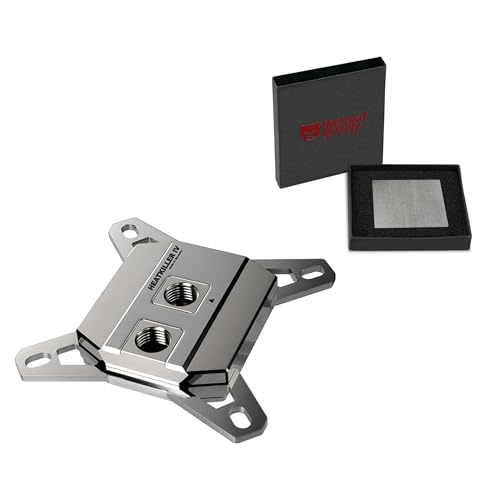
Watercool HEATKILLER IV PRO CPU Water Block
Best for: LGA 1700 builds prioritizing graphene pads
- Socket Compatibility
- LGA 1700 (what this guide is about)
- Material
- Copper + Nickel
- Dimensions
- 2.6 × 2.32 × 0.67 inches
The Watercool HEATKILLER IV PRO supports Intel LGA 1700 sockets with a copper construction and nickel plating. It measures 2.6 inches in length and 2.32 inches in width. This kit includes Thermal Grizzly KryoSheet graphene thermal pads. These pads replace traditional liquid compounds and avoid aging issues. It suits builders who prefer solid-state thermal solutions and premium German manufacturing.
Pros
- Supports Intel LGA 1700 sockets
- Copper base with nickel plating
- Includes Thermal Grizzly KryoSheet graphene pads
- Made in Germany
Cons
- No integrated LCD display
- No RGB lighting
- No software control
Good fit if
- You want graphene thermal pads
- You prefer copper and nickel finishes
- You need LGA 1700 support
Skip if
- You need RGB lighting
- You want an LCD screen
- You prefer aluminum construction
Verdict: Watercool HEATKILLER IV PRO LGA 1700 fits users who value graphene thermal pads and copper construction over digital features. It offers a reliable, non-liquid thermal interface for LGA 1700 builds.

ASUS ROG Ryujin III White CPU Water Block
Best for: Users wanting integrated display and VRM cooling
- Socket Compatibility
- AM4, AM5, LGA 1700 (what this guide is about)
- Lighting
- Full Color LCD Display
- Material
- Copper alloy cold plate
- Display
- LCD Screen
This white Asetek-powered water block for LGA 1700 features a 3.5-inch LCD screen with a 60 FPS refresh rate. It includes an embedded VRM fan that reduces motherboard temperatures by up to 35°C. The copper alloy cold plate uses 178 micro-cooling fins for rapid heat dissipation. Bundled copper ROG fittings ensure seamless flow. It suits builders wanting integrated cooling and display features without custom assembly.
Pros
- 3.5-inch high-resolution LCD display with 60 FPS refresh rate
- Embedded Axial-tech fan reduces VRM temperatures by up to 35°C
- Asetek-powered block with 178 micro-cooling fins and copper cold plate
- Bundled all-copper ROG fittings for loop integration
Cons
- Integrated fan limits flexibility for custom loop configurations
- LCD screen adds bulk and potential failure points compared to plain blocks
- Higher complexity and weight due to embedded electronics
Good fit if
- You want an all-in-one solution with a display and VRM cooling
- You prefer pre-assembled blocks over custom loop components
- You need LGA 1700 compatibility with integrated fan support
Skip if
- You are building a custom loop with separate VRM cooling
- You prefer minimalistic blocks without screens or fans
- You want to maximize radiator space by removing integrated fans
Verdict: ASUS ROG Ryujin III WB White LCD fits users who want an integrated display and VRM cooling in a single unit. It suits those prioritizing convenience and visual features over modular custom loop flexibility.

ASUS ROG Ryujin III Water Block with LCD
Best for: Users wanting an all-in-one Asetek block with display
- Socket Compatibility
- AM4, AM5, LGA 1700 (what this guide is about)
- Lighting
- Full Color LCD Display
- Material
- Copper alloy cold plate
- Display
- LCD Screen
This Asetek-powered water block uses a copper cold plate with 178 micro-cooling fins for efficient heat transfer. It includes a 3.5-inch LCD display with a 60 FPS refresh rate for system monitoring. An embedded Axial-tech fan targets VRM cooling, lowering temperatures by up to 35°C. It supports LGA 1700 and AMD sockets. Bundled copper ROG fittings complete the loop.
Pros
- Asetek-powered copper cold plate with 178 micro-cooling fins
- 3.5-inch LCD display with 60 FPS refresh rate
- Embedded Axial-tech fan for VRM cooling
- Bundled all-copper ROG fittings
Cons
- Large size may interfere with tall RAM modules
- Requires compatible motherboard headers for fan and display
- Limited to specific socket generations despite broad listing
Good fit if
- You want a complete Asetek-based solution with a display
- You need dedicated VRM cooling on your motherboard
- You prefer bundled copper fittings for aesthetic consistency
Skip if
- You are building on a platform without LGA 1700 or AM4/AM5
- You prefer a minimalist look without an LCD screen
- You need a block that fits in extremely tight cases with tall RAM
Verdict: ASUS ROG Ryujin III WB CPU Block offers a complete cooling solution with an integrated display and VRM fan. It fits users who want high-end Asetek performance and visual feedback without buying separate components.

greenDracaena Dracaena.io Intel AIO Block
Best for: compact builds needing a pure copper loop
- Socket Compatibility
- LGA 1700 (what this guide is about)
- Lighting
- 5V ARGB
- Material
- Copper, Acrylic
- Thread Size
- G1/4"
- Dimensions
- 1 × 1 × 1 inches
This greenDracaena water block features a full copper internal loop and a 0.4mm microfin base plate for efficient heat transfer. It supports LGA 1700 and includes a black metal top with 5V ARGB lighting. The package provides a backplate and mounting hardware for Intel sockets. You get a compact 63mm footprint and an ARGB controller for motherboard sync. Thermal paste is not included in the box.
Pros
- Full copper internal water channels with no aluminum in the water path
- 0.4mm microfin base plate for maximum thermal conductivity
- 5V ARGB lighting syncs with major motherboard RGB software
- Includes backplate, mounting hardware, and ARGB controller for LGA 1700
Cons
- No LCD screen or display panel on the top
- Thermal paste is not included in the package
- Lacks software control for lighting beyond standard 5V ARGB headers
Good fit if
- You want a pure copper water path for better conductivity
- You prefer a compact 63mm form factor for your build
- You need a backplate and mounting hardware included for installation
Skip if
- You require an integrated LCD screen for system monitoring
- You prefer a block that includes thermal paste in the box
- You want software-controlled lighting effects without a motherboard header
Verdict: greenDracaena Metal Top LGA 1700 ARGB Block is a solid choice for builders prioritizing a full copper loop and a compact size. It fits users who value thermal conductivity and included mounting hardware over high-end displays or software control.
Specifications side by side
| Spec | Barrow ARGB CPU Water Block | Barrow POM Intel CPU Water Block | Corsair iCUE Link XC7 CPU Water Block | Corsair iCUE Link XC7 RGB CPU Water Block | Corsair XC7 RGB Elite LCD CPU Water Block | Thermaltake Pacific SW1 CPU Water Block | EK-Quantum Velocity 2 LGA 1700 Water Block, White | Watercool HEATKILLER IV PRO CPU Water Block | ASUS ROG Ryujin III White CPU Water Block | ASUS ROG Ryujin III Water Block with LCD | greenDracaena Dracaena.io Intel AIO Block |
|---|---|---|---|---|---|---|---|---|---|---|---|
| Socket Compatibility | not specified | not specified | LGA 1700, AM5 | LGA 1700, AM5 | LGA 1700, AM5 | LGA 1700, AM5 | LGA 1700 | Intel LGA 1700 | LGA 1700, 1200, 115X, AM4, AM5 | LGA 1700, 1200, 115X, AM4, AM5 | not specified |
| Lighting | 5v 3Pin aRGB | not specified | Addressable RGB | Addressable RGB | LCD, Addressable RGB | RGB | Digital RGB | not specified | Full Color LCD Display | Full Color LCD Display | 5V ARGB |
| Material | Acrylic, Nickel-plated Copper | POM | Nickel-plated Copper | Nickel-plated Copper | Nickel-plated Copper | Nickel-plated copper | not specified | Copper + Nickel | Copper alloy cold plate | Copper alloy cold plate | Copper, Acrylic |
| Thread Size | not specified | not specified | not specified | not specified | not specified | not specified | not specified | not specified | not specified | not specified | G1/4" |
| Display | not specified | not specified | not specified | not specified | LCD Screen | not specified | not specified | not specified | LCD Screen | LCD Screen | not specified |
| Dimensions | not specified | not specified | 3.4 × 3.07 × 1.42 inches | 3.4 × 3.07 × 1.42 inches | 3.4 × 3.1 × 1.4 inches | 10 × 2 × 2.7 inches | not specified | 2.6 × 2.32 × 0.67 inches | not specified | not specified | 1 × 1 × 1 inches |
| Weight | not specified | not specified | 5.6 ounces | 5.6 ounces | 7.68 ounces | not specified | not specified | not specified | not specified | not specified | not specified |
| Model | LTYKB-AI | LTSE-04I-POM | CX-9010022-WW | CX-9010021-WW | CX-9010024-WW | CL-W379-CU00SW-A | TR-90663-99084 | TR-60550-99084 | ROG RYUJIN III WB WHT | ROG RYUJIN III WB-AM4 | D-WB-Intel-New |
| Size | not specified | not specified | iCUE LINK XC7 RGB ELITE | iCUE LINK XC7 RGB ELITE | XC7 RGB ELITE LCD | SW1 | not specified | not specified | Water Block|White | Water Block|Black | 1 pcs |
| Color | not specified | not specified | White | Stealth Gray | White | not specified | White Edition | Copper + Nickel | WHITE | BLACK | Black |
You can match your cooling capacity to base power ratings by reviewing the best LGA 1700 processors.
How to choose the right one
-
Check Socket Compatibility
Ensure the block explicitly lists LGA 1700 support. Most options in this guide cover this socket, but some models like the ASUS ROG Ryujin III also support AM4 and AM5. Verify the mounting hardware matches your specific motherboard layout. Using a block not designed for your socket can lead to poor contact or physical damage. Always confirm the manufacturer specifies LGA 1700 in the attributes before purchasing.
-
Decide on Display Needs
Choose an LCD screen if you want real-time data without external tools. The Corsair XC7 RGB Elite LCD and ASUS ROG Ryujin III models include integrated screens for monitoring temperatures. If you prefer a clean look without digital clutter, skip the display. The Barrow ARGB block offers a clear acrylic top instead, providing a transparent aesthetic. Decide if visual feedback is essential for your build style.
-
Evaluate Lighting Options
Select ARGB or RGB lighting based on your motherboard sync capabilities. The Barrow ARGB block and greenDracaena block use ARGB for customizable color effects. Corsair models feature RGB lighting for standard illumination. If you want no lights at all, the Barrow POM block offers a simple design without lighting elements. Match the lighting type to your existing system components for seamless integration.
-
Consider Thermal Interface Type
Check if the block includes pre-applied pads or graphene sheets. The EK-Quantum Velocity 2 comes with a pre-applied thermal pad, simplifying installation. The Watercool HEATKILLER IV PRO uses graphene pads for reliable thermal transfer. These options reduce the mess of traditional thermal paste. If you prefer traditional paste, ensure the block has a flat copper base for optimal contact with your CPU.
-
Verify Ecosystem Requirements
Some blocks require additional hardware for full functionality. The Corsair iCUE Link XC7 models need the System Hub for precise thermal control and lighting management. Ensure you have the required hub before buying. Other blocks, like the Barrow and Thermaltake models, operate independently without extra hubs. Check the product attributes to see if external components are necessary for your desired features.
Frequently asked questions
Which LGA 1700 water block is best for a transparent look?
The Barrow LTYKB-AI is the top choice for users seeking a clear acrylic top plate. It features a solid copper base for effective heat transfer. This model suits builders who want visibility into the coolant flow. It does not include a digital display or sensor, keeping the design simple and focused on aesthetics.
Do I need a special hub for Corsair iCUE Link blocks?
Yes, the Corsair XC7 RGB Elite requires the iCUE Link System Hub for operation. This hub provides precise thermal control and even cooling for modern multi-chip processors. Without the hub, the block cannot function. It is ideal for builders already invested in the iCUE Link ecosystem who need robust thermal management.
Which block includes a built-in temperature sensor?
The Thermaltake Pacific SW1 Plus LGA 1700 Block offers a built-in sensor for real-time thermal data. It delivers reliable cooling without requiring external hardware for monitoring. This feature is ideal for builders who value immediate temperature feedback. The block supports both AM5 and LGA 1700 sockets for versatile compatibility.
Is there an LGA 1700 block with pre-applied thermal paste?
The EK-Quantum Velocity 2 LGA 1700 White Edition comes with a pre-applied thermal pad. This eliminates the mess and precision required for manual thermal paste application. It is a solid choice for builders who value simplicity and clean aesthetics. The block delivers reliable cooling while simplifying the installation process significantly.
Which block supports VRM cooling and has an LCD screen?
The ASUS ROG Ryujin III White LCD integrates an LCD screen and VRM cooling in a single unit. It offers high-end monitoring and visual feedback for your build. This all-in-one solution fits users who prioritize convenience and visual features. It supports LGA 1700, AM4, and AM5 sockets for broad compatibility.
What is the best budget-friendly LGA 1700 option?
The Barrow LTSE-04I-POM is the best budget choice for simple flow-optimized cooling. It features a micro waterway flow design for reliable performance. This model suits users who value cooling efficiency over flashy features like screens or lights. It provides a straightforward solution for builders seeking reliable performance without bulk.
Which block uses graphene thermal pads for heat transfer?
The Watercool HEATKILLER IV PRO LGA 1700 utilizes graphene thermal pads for heat transfer. It offers a reliable, non-liquid thermal interface for your CPU. The copper construction ensures durability and efficient cooling. This model fits users who prioritize material quality and thermal conductivity over digital features or complex software integration.
Can I find a compact copper block for small builds?
The greenDracaena Dracaena.io Intel AIO Block is designed for compact builds. It features a full copper construction for superior thermal conductivity. The compact size makes it ideal for smaller cases. It includes ARGB lighting and mounting hardware, offering a solid choice for builders who value thermal performance and included accessories.