Display Explained: What It Means for Aio Liquid Coolers
As an Amazon Associate we earn from qualifying purchases. Links on this page are affiliate links.
Display Explained for AIO Coolers
An LCD screen on an AIO liquid cooler provides real-time system data directly on the pump head. This spec allows you to monitor temperatures, fan speeds, or water levels without opening your case or launching separate software. The display explained in this guide focuses on the hardware capabilities you see listed in product specifications.
Manufacturers label this feature as "LCD Screen," "IPS Display," or "Mini Display." You will see specific metrics in the data sheet. These include resolution, such as 320x240 pixels. Brightness is often listed in nits. The color depth, measured in bits, determines how many colors the panel can show. Some listings mention refresh rates, though this is less common for static system monitoring. The size of the screen, measured in inches, affects readability from a distance.
These screens connect internally to the pump controller. The data comes from sensors on the cold plate or inside the loop. You configure what information appears through companion software or onboard buttons. The software translates sensor readings into visual graphs, numbers, or images. This direct feed means you get immediate feedback on your cooling performance.
Buyers care about this spec for convenience and aesthetics. It eliminates the need to check system monitors on your desktop. You can verify pump function and loop temperature at a glance. The visual element also adds a custom look to your build. When comparing options, check the resolution and brightness first. A low-resolution or dim screen may be hard to read in bright rooms. Ensure the listed size fits your case layout. This spec transforms your cooler from a passive component into an active information hub.
LCD Screen Display Variants
LCD Screen
An LCD screen allows you to view system metrics directly on the cooler. You can monitor CPU temperatures, fan speeds, or water levels without launching software. This feature suits users who want constant visual feedback without interrupting their workflow. The trade-off is added weight and complexity to the pump head. For example, the ASUS ROG Ryujin III 240 features a large 3.5-inch display for detailed monitoring. The NZXT Kraken Elite 240 offers a high-refresh-rate square screen for brighter visuals. The Thermaltake TH360 V2 Ultra provides a sharp 480x480 resolution for clear images. These displays integrate hardware and software, requiring specific management tools for full functionality. You must ensure your case has enough clearance for the larger pump block.
LCD Screen
The presence of an LCD screen defines the visual interface of your build. It replaces the need for third-party monitoring apps during daily use. The ASUS Prime LC 3-Fan ARGB Cooler includes this spec for motherboard owners. It delivers reliable cooling with reinforced hoses. The ID-COOLING 240mm White Liquid Cooler offers a customizable 2.1-inch display for metrics or media. This option fits white builds with 240mm radiators. You get real-time data without software overhead. However, the pump block becomes bulkier. You must check case compatibility for the larger dimensions. The display adds aesthetic value but requires proper airflow around the pump head to maintain cooling efficiency.
Is The Display Worth It
Who needs it
You should choose an AIO with an LCD screen if you prefer immediate visual feedback. This spec allows you to check CPU temperatures, fan speeds, or water levels directly on the pump head. You do not need to open your case or launch separate monitoring software to see system status. This convenience suits users who want constant data without interrupting their workflow. If you frequently adjust settings or monitor performance during intensive tasks, having this information right in front of you saves time. It eliminates the need to alt-tab or switch windows. You get real-time updates without additional setup. This feature is ideal for those who value transparency and ease of access to critical system metrics during daily use or gaming sessions.
Who can skip it
You can ignore the LCD screen if you already use software-based monitoring tools. Many users prefer checking temperatures and fan curves through dedicated applications on their desktop. If you are comfortable using software to track system health, the physical display adds little value to your experience. You might also skip this feature if you prioritize cooler performance or noise levels over aesthetics. The pump head with a screen often costs more than a standard block. You could redirect those funds toward better fans or a larger radiator. Additionally, if you keep your case closed and rarely look at the front of your PC, the screen remains unseen. In these cases, focusing on cooling efficiency and reliability is a smarter use of your budget than paying for an extra visual component.
Key Display Terms
Pump Head
The block mounted on the CPU that houses the pump and display. This area directs coolant flow and often serves as the primary mounting point for the visual screen.
LCD Panel
The liquid crystal display screen embedded in the cooler head. It renders images or text to show system stats like temperature, usage, or custom graphics in real time.
Resolution
The pixel count of the display, such as 240x240. Higher resolution allows for sharper text and clearer images, making small details easier to read from a distance.
Content Size
The physical dimensions of the screen, typically around 2.4 inches. This size determines how much information fits on the display without requiring excessive scrolling or zooming.
Custom Image
User-uploaded graphics or GIFs that replace default stats. You can personalize the look of your build by loading specific visuals that match your aesthetic preferences.
Software Control
The companion application used to configure display settings. You use this tool to select which metrics appear on the screen and to upload custom images or animations.
Quick picks
| # | Product | Best for | Price |
|---|---|---|---|
| 1 | ASUS Prime LC 3-Fan ARGB Cooler with LCD | Prime motherboard owners wanting an LCD display | Check price of ASUS Prime LC 3-Fan ARGB Cooler with LCD on Amazon |
| 2 | NZXT Kraken Elite 240 RGB White LCD Cooler | Users prioritizing screen brightness and refresh rate | Check price of NZXT Kraken Elite 240 RGB White LCD Cooler on Amazon |
| 3 | ASUS ROG Ryujin III 240 with 3.5-Inch LCD | Users wanting a large LCD and Noctua fans | Check price of ASUS ROG Ryujin III 240 with 3.5-Inch LCD on Amazon |
| 4 | ASUS ROG Ryujin III 240mm LCD Cooler | users wanting large display monitoring | Check price of ASUS ROG Ryujin III 240mm LCD Cooler on Amazon |
| 5 | ID-COOLING 240mm White Liquid Cooler with LCD Screen | White builds with 240mm radiators | Check price of ID-COOLING 240mm White Liquid Cooler with LCD Screen on Amazon |
| 6 | Thermaltake TH360 V2 Ultra LCD Cooler | Users wanting a large 360mm radiator and high-res LCD | Check price of Thermaltake TH360 V2 Ultra LCD Cooler on Amazon |
Our 6 picks

ASUS Prime LC 3-Fan ARGB Cooler with LCD
Best for: Prime motherboard owners wanting an LCD display
- Display
- LCD Screen (what this guide is about)
- Socket Compatibility
- LGA 1851, 1700, 1200, 115X, AMD AM5, AM4
- Display Size
- 2.3"
- Lighting Type
- ARGB
- Dimensions
- 19.4 × 9.53 × 5.98 inches
- Weight
- 2 pounds
View on Amazon: ASUS Prime LC 3-Fan ARGB Cooler with LCD Affiliate link
The ASUS Prime LC ARGB is a 360mm AIO liquid cooler designed to match Prime motherboards. It features an Asetek pump for reliable cooling and chainable fans for static pressure and airflow. The unit includes an LCD screen for visual feedback. Reinforced jacketed hoses add durability. This cooler suits users seeking integrated aesthetics and dependable performance from a trusted brand.
Pros
- Integrated LCD screen for display
- 360mm radiator size for high heat dissipation
- Chainable fans for static pressure and airflow
- Reinforced jacketed hoses for durability
Cons
- Limited to ARGB lighting only
- Black color option restricts white build themes
- No app control mentioned in specifications
Good fit if
- You own a Prime motherboard for aesthetic matching
- You want an LCD screen for system monitoring
- You prefer reinforced hoses for durability
Skip if
- You need RGB lighting for full color control
- You require a white color scheme
- You want app-based software control
Verdict: ASUS Prime LC ARGB 360mm AIO fits users who value the Prime motherboard aesthetic and an LCD display. It delivers reliable cooling with reinforced hoses, though it lacks RGB flexibility and app support.

NZXT Kraken Elite 240 RGB White LCD Cooler
Best for: Users prioritizing screen brightness and refresh rate
- Display
- LCD Screen (what this guide is about)
- Radiator Size
- 240mm
- Socket Compatibility
- Intel, AMD
- Display Size
- 2.36"
- Display Resolution
- 640x640
- Pump Speed
- 2800 RPM
View on Amazon: NZXT Kraken Elite 240 RGB White LCD Cooler Affiliate link
This NZXT Kraken Elite 240 features a 2.36-inch square LCD screen with 640x640 resolution. It runs at 60Hz with a 690cd/m² backlight. The Asetek pump reaches 2800 RPM. RGB fans provide cooling and lighting. You get a clear display for images or metrics. It suits users who want a bright, high-refresh-rate screen on a 240mm radiator.
Pros
- 2.36-inch LCD with 640x640 resolution
- 60Hz refresh rate for smooth animation
- 690cd/m² backlight brightness
- Asetek pump up to 2800 RPM
Cons
- Square 640x640 display is lower resolution than circular 480x480 screens
- 240mm radiator limits cooling capacity for high-end CPUs
- Requires CAM software for full functionality
Good fit if
- You want a bright, high-refresh-rate LCD screen
- You prefer a square display format
- You use a 240mm radiator setup
Skip if
- You need a 360mm radiator for extreme cooling
- You prefer a circular display design
- You want a higher resolution screen than 640x640
Verdict: NZXT Kraken Elite 240 RGB LCD offers a bright, high-refresh-rate square display for users who prioritize screen quality on a 240mm cooler.

ASUS ROG Ryujin III 240 with 3.5-Inch LCD
Best for: Users wanting a large LCD and Noctua fans
- Display
- LCD Screen (what this guide is about)
- Radiator Size
- 240mm
- Display Size
- 3.5"
- Fan Speed
- 2000 RPM
- Weight
- 3.1 pounds
View on Amazon: ASUS ROG Ryujin III 240 with 3.5-Inch LCD Affiliate link
This AIO features a 3.5-inch LCD screen for system stats or custom GIFs. It uses an 8th gen Asetek pump and Noctua fans rated for 2000 RPM. The 240mm radiator fits standard cases. You get control via Armoury Crate software. It suits users who want high airflow and a large display for monitoring.
Pros
- 3.5-inch LCD display supports custom GIFs
- 8th gen Asetek pump with 3-phase motor
- Noctua iPPC-2000 PWM fans reach 2000 RPM
- Armoury Crate software for full control
Cons
- 3.1 pounds weight is heavier than some competitors
- 240mm radiator size limits compatibility with smaller cases
- Requires Armoury Crate software for full functionality
Good fit if
- You want a large 3.5-inch display for detailed monitoring
- You prefer Noctua fans for their airflow performance
- You have a case that fits a 240mm radiator
Skip if
- You need a 360mm radiator for higher heat loads
- You want a lighter cooler for easy installation
- You prefer hardware buttons over software control
Verdict: ASUS ROG Ryujin III 240 LCD offers a large 3.5-inch display and premium Noctua fans for users who prioritize visual feedback and airflow. It fits best in mid-tower cases that support 240mm radiators.
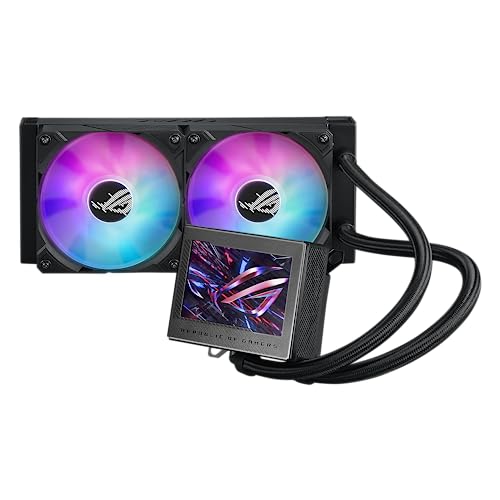
ASUS ROG Ryujin III 240mm LCD Cooler
Best for: users wanting large display monitoring
- Display
- LCD Screen (what this guide is about)
- Radiator Size
- 240mm
- Display Size
- 3.5"
- Lighting Type
- ARGB
- Weight
- 3.1 pounds
View on Amazon: ASUS ROG Ryujin III 240mm LCD Cooler Affiliate link
The ASUS ROG Ryujin III 240 ARGB features a 3.5-inch LCD display for system monitoring and custom GIFs. It uses an Asetek 8th gen pump and includes ARGB fans. This cooler suits users who want detailed hardware visibility and customizable lighting on a 240mm radiator.
Pros
- 3.5-inch LCD screen for monitoring
- Supports custom animated GIFs
- Asetek 8th gen pump technology
- ARGB magnetic daisy-chainable fans
Cons
- Larger 3.5-inch display may not fit all cases
- Requires Armoury Crate software for full control
- Heavier build at 3.1 pounds
Good fit if
- You want a large display for detailed stats
- You prefer ARGB lighting customization
- You have space for a 240mm radiator
Skip if
- You need a smaller display size
- You want to avoid software dependencies
- You prefer a lighter cooler
Verdict: The ASUS ROG Ryujin III 240 ARGB fits enthusiasts who prioritize a large 3.5-inch LCD for detailed system monitoring and advanced ARGB lighting control.
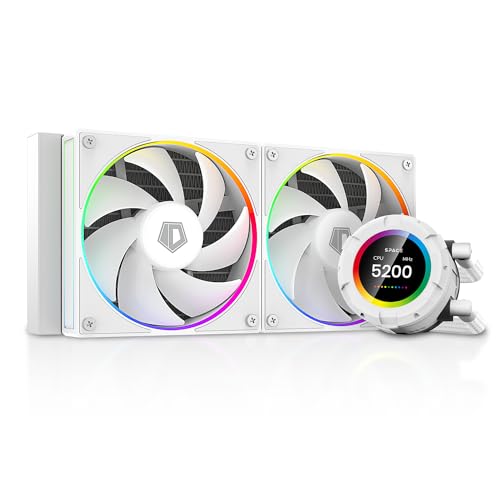
ID-COOLING 240mm White Liquid Cooler with LCD Screen
Best for: White builds with 240mm radiators
- Display
- LCD Screen (what this guide is about)
- Radiator Size
- 240mm
- Socket Compatibility
- LGA 20XX/1851/1700/115X/1200, AM4/AM5
- Display Size
- 2.1"
- Display Resolution
- 480x480
- Pump Speed
- 2500 RPM ± 10%
View on Amazon: ID-COOLING 240mm White Liquid Cooler with LCD Screen Affiliate link
This 240mm AIO cooler features a 2.1-inch LCD screen with 480x480 resolution. You can display images, GIFs, MP4 files, or real-time performance metrics like CPU temperature and fan speeds. The pump runs at 2500RPM, and the fans use FDB bearings for stable airflow up to 78CFM. It includes ARGB lighting and supports major Intel and AMD sockets. It suits users who want a white aesthetic with a functional display.
Pros
- 2.1-inch LCD screen with 480x480 resolution
- Supports custom images, GIFs, MP4, and metrics
- FDB fans deliver 78CFM airflow
- Pump speed rated at 2500RPM
- ARGB lighting on pump and fans
Cons
- Smaller 2.1-inch display compared to 3.5-inch or 5-inch options
- Lower 480x480 resolution limits image detail
- Requires space software for customization
Good fit if
- You want a white AIO with a functional LCD
- You prefer a 240mm radiator size
- You like displaying custom media or metrics
Skip if
- You need a large high-resolution display
- You prefer a 360mm radiator
- You want native software without extra installation
Verdict: ID-COOLING SL240 White 240mm AIO fits builders who want a compact white cooler with a customizable 2.1-inch display for metrics or media.

Thermaltake TH360 V2 Ultra LCD Cooler
Best for: Users wanting a large 360mm radiator and high-res LCD
- Display
- LCD Screen (what this guide is about)
- Radiator Size
- 360mm
- Socket Compatibility
- AM4, AM5, LGA 1700, LGA 1200
- Display Size
- 2.1"
- Fan Speed
- 1500 RPM
- Lighting Type
- ARGB
View on Amazon: Thermaltake TH360 V2 Ultra LCD Cooler Affiliate link
The Thermaltake TH360 V2 Ultra features a 360mm radiator and a 2.1-inch LCD screen with 480x480 resolution. It supports ARGB lighting and syncs with major motherboard software suites. This cooler suits users who want a large cooling surface and a high-definition display for custom visuals. It fits standard Intel and AMD sockets. The unit relies on the TT RGB Plus 2.0 software for full control.
Pros
- 360mm radiator size for high heat dissipation
- 2.1-inch LCD with 480x480 resolution
- ARGB lighting syncs with ASUS, Gigabyte, MSI, and ASRock software
- Copper base plate for efficient heat transfer
Cons
- Requires TT RGB Plus 2.0 software for operation
- 18-inch length may not fit smaller cases
- No mention of native motherboard sync for the LCD display
Good fit if
- You need a 360mm radiator for high-end CPUs
- You want a high-resolution 2.1-inch LCD display
- You use motherboard RGB software for lighting control
Skip if
- You prefer a 240mm radiator size
- You want to avoid third-party software for display control
- You have a case with limited radiator length clearance
Verdict: Thermaltake TH360 V2 Ultra 360mm AIO is a solid choice for builders prioritizing a large 360mm radiator and a sharp 480x480 LCD screen. It works well if you are comfortable using the TT RGB Plus 2.0 software for management.
Specifications side by side
| Spec | ASUS Prime LC 3-Fan ARGB Cooler with LCD | NZXT Kraken Elite 240 RGB White LCD Cooler | ASUS ROG Ryujin III 240 with 3.5-Inch LCD | ASUS ROG Ryujin III 240mm LCD Cooler | ID-COOLING 240mm White Liquid Cooler with LCD Screen | Thermaltake TH360 V2 Ultra LCD Cooler |
|---|---|---|---|---|---|---|
| Radiator Size | not stated | 240mm | 240mm | 240mm | 240mm | 360mm |
| Socket Compatibility | LGA 1851, 1700, 1200, 115X, AMD AM5, AM4 | Intel, AMD | not stated | not stated | LGA 20XX/1851/1700/115X/1200, AM4/AM5 | AM4, AM5, LGA 1700, LGA 1200 |
| Display Size | 2.3" | 2.36" | 3.5" | 3.5" | 2.1" | 2.1" |
| Display Resolution | not stated | 640x640 | not stated | not stated | 480x480 | not stated |
| Pump Speed | not stated | 2800 RPM | not stated | not stated | 2500 RPM ± 10% | not stated |
| Fan Speed | not stated | not stated | 2000 RPM | not stated | not stated | 1500 RPM |
| Lighting Type | ARGB | RGB | not stated | ARGB | ARGB | ARGB |
| Lighting | ARGB | RGB | not stated | ARGB | ARGB | ARGB |
| Display | LCD Screen | LCD Screen | LCD Screen | LCD Screen | LCD Screen | LCD Screen |
| Size | 240 mm | 240Mm | 240mm|Black | ARGB | not stated | 360Mm |
| Dimensions | 19.4 × 9.53 × 5.98 inches | 7.87 × 13.8 × 11.8 inches | not stated | not stated | not stated | 18 × 8.3 × 5.6 inches |
| Weight | 2 pounds | 4.41 pounds | 3.1 pounds | 3.1 pounds | not stated | not stated |
| Color | black | white | not stated | not stated | SL240 WHITE | Black |
| Model | 90RC00Z1-B0EAY0 | RL-KR24E-W1 | ROG RYUJIN III 240 | ROG RYUJIN III 240 ARGB | not stated | CLW384PL12SWA |
Frequently asked questions
How large are the LCD screens on AIO coolers?
Screen sizes vary by model. The ASUS ROG Ryujin III 240 features a large 3.5-inch display. The NZXT Kraken Elite 240 uses a square screen format. The ID-COOLING SL240 White includes a smaller 2.1-inch panel. Thermaltake offers a high-resolution 480x480 pixel display on its 360mm unit. You should check the specific dimensions before buying to ensure it fits your case.
Can I monitor CPU temperatures with these displays?
Yes, the primary function is real-time monitoring. You can view CPU temperatures, fan speeds, and water levels directly on the pump head. This allows you to check system health without launching separate software or opening your case. The ASUS Prime LC and NZXT Kraken Elite both support this continuous visual feedback for system metrics.
Do these coolers require software to manage the display?
Management often depends on the brand. The Thermaltake TH360 V2 Ultra works with the TT RGB Plus 2.0 software for content management. Some ASUS models lack full app support, limiting customization. You should verify if the specific cooler requires third-party software to update the screen content or adjust lighting patterns.
Which AIOs have the brightest or sharpest screens?
Screen quality varies by manufacturer. The NZXT Kraken Elite 240 is noted for its bright, high-refresh-rate square display. The Thermaltake TH360 V2 Ultra provides a sharp 480x480 resolution on its large 360mm radiator. These specs suit users who prioritize visual clarity and responsiveness in their system monitoring interface.
Are there white options with LCD screens?
Yes, white variants are available. The NZXT Kraken Elite 240 RGB White includes a white finish with an LCD screen. The ID-COOLING SL240 White offers a compact white cooler with a customizable 2.1-inch display. These options fit builders who want to maintain a specific color scheme while retaining advanced monitoring features.
Do these coolers use ARGB or RGB lighting?
Lighting types differ by model. The ASUS Prime LC 3-Fan and ROG Ryujin III 240 ARGB use ARGB lighting. The NZXT Kraken Elite 240 RGB uses standard RGB. The Thermaltake TH360 V2 Ultra also features ARGB. You should check the lighting specification to ensure compatibility with your motherboard or controller.
What size radiators support LCD displays?
LCD displays appear on various radiator sizes. You can find them on 240mm units like the NZXT Kraken Elite and ASUS ROG Ryujin III. Larger 360mm options are also available, such as the ASUS Prime LC and Thermaltake TH360 V2. The ID-COOLING SL240 is a compact 240mm choice. Ensure your case supports the required radiator size.
How heavy are AIO coolers with LCD screens?
Weight varies based on the pump head and radiator size. The ASUS ROG Ryujin III 240 weighs 3.1 pounds. The NZXT Kraken Elite 240 RGB White weighs 4.41 pounds. The ASUS Prime LC 3-Fan weighs 2 pounds. Heavier units may require additional case support to prevent stress on the CPU socket during installation.