TRYX Panorama 360 ARGB 360mm vs TRYX Panorama WB CPU Water (2026): Key Differences
As an Amazon Associate we earn from qualifying purchases. Links on this page are affiliate links.
This tryx panorama 360 argb 360mm vs panorama wb CPU water comparison helps you decide between an all-in-one cooler and a custom loop component. Both units share a 6.67-inch curved 2K AMOLED display with anamorphic effects. The main difference lies in their function. One is a complete pre-filled AIO system with fans. The other is a standalone water block for custom loops. You need to choose based on your build type.
Key differences
| Aspect | TRYX Panorama 360 ARGB AMOLED AIO | TRYX Panorama WB 6.67" AMOLED CPU Block |
|---|---|---|
| Product Type | 360mm AIO with 3x 120mm fans | Standalone CPU water block |
| Socket Compatibility | LGA 1700/1200/115X, AM4/AM5 | LGA 1851/1700/1200/115X, AM4/AM5 |
| Pump Architecture | Asetek 8th Gen | Asetek Gen8 V2 |
| Integrated VRM Cooling | Not listed | Built-in 4-pin PWM VRM fan |
| Fittings | Not listed | Brass G1/4 90° rotary fittings |
| Warranty | Not listed | 6-year total coverage |
Which one should you choose?
Choose TRYX Panorama 360 ARGB AMOLED AIO if
- You want a plug-and-play solution that includes radiators and fans.
- You prefer a standard AIO installation without custom tubing.
- You need broad compatibility with older Intel sockets like LGA 1155.
Choose TRYX Panorama WB 6.67" AMOLED CPU Block if
- You are building a custom liquid cooling loop.
- You want integrated VRM fan cooling for overclocking.
- You need support for the latest LGA 1851 socket.
Verdict: Choose the Panorama 360 ARGB if you want a complete, self-contained cooling solution with pre-installed fans. Pick the Panorama WB if you are constructing a custom loop and need specific fittings and VRM fan support. Both offer identical high-quality displays for visual customization.
TRYX Panorama AIO vs WB Comparison
Display and visuals
Both coolers feature a 6.67-inch curved 2K AMOLED screen with a 60Hz refresh rate. The TRYX Panorama 360 ARGB AIO uses an L-shaped design to provide full visibility from multiple angles, avoiding blind spots in typical PC cases. It supports 3D anamorphic effects and allows you to upload PNG, JPG, GIF, and MP4 files up to 500MB. The Panorama WB water block also offers anamorphic visuals but adds native GIPHY integration through the KANALI software. This gives you instant access to thousands of GIFs without manual downloading. The WB block boasts a 372 PPI pixel density for vivid color reproduction. While both deliver high-quality displays, the AIO offers better viewing angles, whereas the WB provides richer content options.
Cooling architecture
The TRYX Panorama 360 ARGB AIO is a complete unit powered by an Asetek 8th Gen pump. It handles up to 320W TDP and features 30mm high-density fins. The tubing is 40% thicker than the previous generation to improve heat transfer. It comes with three 120mm fans that operate at under 27.86dB(A) under full load. In contrast, the Panorama WB is a custom loop component built on the Asetek Gen8 V2 thermal architecture. It uses a 55.5x55.5mm microchannel copper cold plate for rapid heat transfer. It also includes a built-in 4-pin PWM VRM fan that runs up to 3300RPM with 17.4CFM airflow, keeping voltage regulators cool at just 22dB. The AIO is ready to use, while the WB requires your custom loop setup.
Socket compatibility
Socket support varies slightly between the two models. The TRYX Panorama 360 ARGB AIO supports Intel LGA 1851, 1700, 1200, 1151, 1150, and 1155, as well as AMD AM4 and AM5. It uses all-metal mounting hardware for reliable installation. The Panorama WB water block supports Intel LGA 1851, 1700, 1200, 115X, and AMD AM4 and AM5. Both cover the latest AM5 and LGA 1700/1851 sockets. The AIO explicitly lists older Intel sockets like 1150 and 1151, which are not mentioned for the WB block. If you have an older Intel platform, the AIO offers broader backward compatibility. For modern builds, both are equally suitable.
Software and control
Both products use the TRYX KANALI software for customization and monitoring. The AIO allows you to control fan speeds, lighting effects, and screen content with near-zero system resource usage. You can switch screens instantly and use split-screen display capabilities. The WB block also uses KANALI for hardware monitoring, split-screen display, and filter settings. It uniquely integrates GIPHY for easy content browsing. The AIO supports local file uploads up to 500MB, including MP4 videos. The WB block focuses on seamless GIF access via GIPHY. Both offer intuitive adjustments and minimal resource consumption. The choice depends on whether you prefer local media control or integrated online content libraries.
Warranty and support
Warranty coverage is a key difference. The Panorama WB water block is backed by a 6-year total coverage plan. This includes 3 years of specific coverage for the display screen. The TRYX Panorama 360 ARGB AIO data does not specify warranty terms. If display longevity is a priority, the WB block offers explicit protection for its screen. The AIO may have standard coverage, but the details are not listed in the provided specifications. For users who want guaranteed screen protection, the WB block provides clear, long-term assurance. The AIO lacks this specific information in the current data.
Choose the right TRYX cooler
You want a simple plug-and-play setup
The TRYX Panorama 360 ARGB AIO is a complete unit. It includes a 360mm radiator and three pre-installed 120mm fans. You get an Asetek 8th Gen pump rated for 320W TDP. The L-shaped screen avoids blind spots. Installation is straightforward with all-metal hardware for Intel and AMD sockets. You do not need to build a custom loop.
You are building a custom water loop
The TRYX Panorama WB is a CPU water block for custom loops. It uses an Asetek Gen8 V2 architecture with a 55.5mm microchannel copper cold plate. It includes brass G1/4 fittings for easy tubing connection. A built-in 4-pin PWM VRM fan cools motherboard regulators at up to 3300 RPM. You need to source the rest of the loop components.
You need VRM cooling without extra fans
Only the Panorama WB includes a dedicated VRM fan. It delivers 17.4 CFM of airflow at up to 3300 RPM. This actively cools voltage regulators with noise under 22 dB. The AIO relies on its main radiator fans. If you want targeted VRM cooling integrated into the block, the WB is the correct choice for your build.
The products compared

TRYX Panorama 360 ARGB AMOLED AIO
Best for: Users wanting a large curved AMOLED display
- Radiator Size
- 360mm
- Socket Compatibility
- Intel LGA 1700/1200/115X AMD AM5/AM4
- Display Size
- 6.67"
- Display Resolution
- 2K
- Thermal Capacity
- 320W TDP
- Lighting Type
- ARGB
View on Amazon: TRYX Panorama 360 ARGB AMOLED AIO Affiliate link
The TRYX Panorama 360 ARGB AIO features a 6.67-inch curved AMOLED display with a 2K resolution and 60Hz refresh rate. It uses an Asetek 8th Gen pump rated for 320W TDP and includes three 120mm fans. The L-shaped screen design aims to reduce blind spots. You get full customization via the KANALI software for images and videos. This cooler suits users who want a prominent visual centerpiece for their build.
Pros
- 6.67-inch curved 2K AMOLED display with 60Hz refresh rate
- L-shaped screen design for better multi-angle visibility
- Asetek 8th Gen pump with 320W TDP capacity
- Supports custom PNG, JPG, GIF, MP4, and AVI media uploads
Cons
- 30mm thick radiator may not fit in smaller cases
- Requires software installation for display and fan control
- No mention of a dedicated hardware controller box
Good fit if
- You want a high-resolution screen for displaying custom media
- You have a case with ample space for a 360mm radiator
- You prefer software-based customization for lighting and display content
Skip if
- You need a compact cooler for a small form factor case
- You prefer a standard flat screen without anamorphic effects
- You want a cooler with a built-in hardware display controller
Verdict: TRYX Panorama 360 ARGB AIO is a strong choice for users seeking a large, high-resolution curved display for their PC case. It fits builders who prioritize visual customization and have the space for a 360mm radiator.
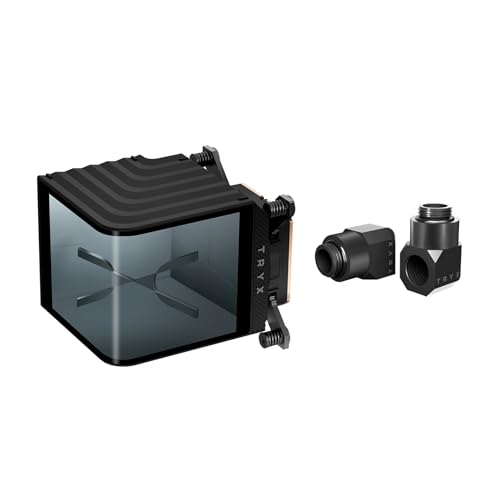
TRYX Panorama WB 6.67" AMOLED CPU Block
Best for: Custom loop builders wanting AMOLED displays and VRM cooling
- Socket Compatibility
- LGA 1851/1700/1200/115X, AM4/AM5
- Display Size
- 6.67"
- Display Resolution
- 2K
- Material
- Copper
- Thread Size
- G1/4
- Dimensions
- 9.09 × 6.1 × 6.1 inches
View on Amazon: TRYX Panorama WB 6.67" AMOLED CPU Block Affiliate link
This custom loop CPU water block pairs an Asetek Gen8 V2 thermal base with a curved 6.67-inch 2K AMOLED display. It features a built-in 4-pin PWM VRM fan running up to 3300 RPM. The block supports G1/4 fittings and covers Intel LGA 1851 to 115X and AMD AM4/AM5 sockets. It suits builders seeking high-resolution visual feedback and integrated VRM cooling in a single unit.
Pros
- 6.67-inch curved 2K AMOLED screen with 60Hz refresh rate
- Built-in 4-pin PWM VRM fan with 3300 RPM max speed
- Native GIPHY integration via TRYX KANALI software
- Asetek Gen8 V2 thermal architecture with copper cold plate
Cons
- Requires custom loop plumbing rather than being a complete AIO
- Weight of 2.43 pounds adds significant mass to the motherboard
- Limited to G1/4 fittings without included hard tubing
Good fit if
- You are building a custom liquid cooling loop
- You want integrated VRM cooling on the motherboard
- You prefer high-resolution AMOLED displays over LCD panels
Skip if
- You need a plug-and-play all-in-one cooler
- You are using a socket not listed in the compatibility data
- You prefer lightweight components for easier installation
Verdict: TRYX Panorama WB 6.67" AMOLED CPU Block delivers a premium visual experience with its curved 2K screen and practical VRM fan for custom loop builders. It fits users who want high-end thermal performance and detailed hardware monitoring without adding a separate fan.
Specifications side by side
| Spec | TRYX Panorama 360 ARGB AMOLED AIO | TRYX Panorama WB 6.67" AMOLED CPU Block |
|---|---|---|
| Radiator Size | 360mm | not stated |
| Socket Compatibility | Intel LGA 1700/1200/115X AMD AM5/AM4 | LGA 1851/1700/1200/115X, AM4/AM5 |
| Display Size | 6.67" | 6.67" |
| Display Resolution | 2K | 2K |
| Thermal Capacity | 320W TDP | not stated |
| Lighting Type | ARGB | not stated |
| Lighting | ARGB | not stated |
| Material | not stated | Copper |
| Thread Size | not stated | G1/4 |
| Dimensions | 16.2 × 8.3 × 5.9 inches | 9.09 × 6.1 × 6.1 inches |
| Weight | not stated | 2.43 pounds |
| Size | 360 mm (2024) | not stated |
| Color | P360A BK | Black |
| Model | L-P360A-AS3M-G0K | L-P0CL-DS0M-G0K |
Frequently asked questions
Is the TRYX Panorama 360 ARGB AIO compatible with my motherboard?
Yes, it supports AM4, AM5, and LGA 1700 sockets. This broad compatibility covers most modern AMD and Intel platforms. You can verify your specific socket type before installation. The cooler is designed to fit standard ATX cases with 360mm radiator mounts. Check your case dimensions to ensure the 16.2-inch length fits comfortably.
Does the TRYX Panorama WB CPU Block include a radiator?
No, this product is a CPU water block for custom loops only. It does not include a radiator, pump, or tubing. You must source these components separately to build a complete cooling system. This unit is intended for enthusiasts who already have a custom loop setup or plan to build one from scratch.
What are the dimensions of the TRYX Panorama 360 ARGB AIO?
The AIO measures 16.2 inches in length, 8.3 inches in width, and 5.9 inches in height. These dimensions define the space required for the radiator and fans in your case. The large size accommodates the 360mm radiator and the integrated AMOLED display. Ensure your PC case has sufficient clearance for these measurements.
How heavy is the TRYX Panorama WB CPU Block?
The block weighs 2.43 pounds. This weight is due to the robust construction needed for custom loop integration. The substantial mass helps stabilize the block on the CPU socket. You should ensure your motherboard is securely mounted to support this weight without flexing. The dimensions are 9.09 inches long and 6.1 inches wide.
Can I use the TRYX Panorama WB for a pre-built PC?
No, the WB model is designed for custom water cooling loops. It requires separate tubing, a pump, and a radiator. Pre-built PCs typically use all-in-one coolers or air coolers. You would need to modify the case significantly to install this block. It is best suited for enthusiasts building a system from individual components.
What sockets does the TRYX Panorama WB support?
The provided data does not list specific socket compatibility for the WB block. However, custom loop blocks often support multiple platforms. You should check the manufacturer's detailed documentation for exact mounting hardware. The block features a curved AMOLED display and VRM cooling fan for visual and thermal benefits.