TRYX Panorama 360 ARGB 360mm vs TRYX Stage AIO Cooler 360mm: Spec Comparison
As an Amazon Associate we earn from qualifying purchases. Links on this page are affiliate links.
You are comparing the tryx panorama 360 argb 360mm vs stage aio cooler 360mm. Both units use 360mm radiators and ARGB lighting. They share the TRYX KANALI software for control. The main difference lies in their display setups. The Panorama features a single large curved screen. The Stage uses two smaller screens. This changes how you view content and monitor your system. Each design serves a different visual preference.
Key differences
| Aspect | TRYX Panorama 360 ARGB AMOLED AIO | TRYX Stage 360mm AIO with Dual 4-inch Screens |
|---|---|---|
| Display Type | Single 6.67" curved AMOLED screen | Dual 4.0" IPS screens |
| Display Resolution | 2K resolution | 720x720 per screen |
| Pump Generation | Asetek 8th Gen | Asetek 7th Gen V2 |
| Thermal Capacity | 320W TDP | 280W TDP |
| Unique Features | 3D anamorphic effect | Built-in GIPHY access |
| Warranty | Not listed | 6 years AIO, 3 years screen |
Which one should you choose?
Choose TRYX Panorama 360 ARGB AMOLED AIO if
- You want a single large screen with higher resolution and anamorphic effects
- You prefer a pump with a higher 320W TDP rating
- You want to display custom 3D content without splitting the view
Choose TRYX Stage 360mm AIO with Dual 4-inch Screens if
- You prefer dual screens for split-view or extended display modes
- You want built-in access to GIPHY for easy content updates
- You need a specified 6-year warranty on the AIO unit
Verdict: Choose the Panorama if you prioritize a high-resolution single display and higher thermal capacity. Choose the Stage if you prefer the flexibility of dual screens and built-in GIPHY integration. Both models offer robust compatibility and software control.
Panorama vs Stage Spec Breakdown
Display Size
The TRYX Panorama 360 ARGB AMOLED AIO features a single, large 6.67-inch curved screen. It offers a 2K resolution and a 60Hz refresh rate, designed for anamorphic 3D effects. The TRYX Stage AIO Cooler uses a dual-screen setup with two 4.0-inch IPS panels. Each screen has a 720x720 resolution and 254 PPI pixel density. The Panorama provides a larger, more immersive canvas for videos and custom media. The Stage offers two smaller screens that can be used in mirror, split, or extended modes for different visual layouts.
Thermal Capacity
Cooling performance starts with the pump and radiator design. The Panorama 360 ARGB utilizes an Asetek 8th Gen pump with a strong 3-phase motor. It supports a maximum thermal capacity of 320W TDP. The Stage AIO Cooler is equipped with an Asetek 7th Gen V2 pump and a raised micro-convex cold plate. It supports up to 280W TDP. The Panorama handles higher thermal loads with its newer pump generation and thicker tubing. This makes it suitable for systems with more demanding power requirements.
Display Features
Both coolers use the TRYX KANALI software for customization. The Panorama supports instant screen content switching, split-screen display, and quick recording. It allows you to upload PNG, JPG, GIF, MP4, and AVI files up to 500MB. The Stage integrates native GIPHY connectivity for effortless access to thousands of GIFs without manual downloading. It also supports real-time system monitoring and gameplay capture. The Panorama offers more control over local media files and video formats. The Stage simplifies content selection through direct GIPHY integration.
Physical Dimensions
Size matters for case compatibility. The Panorama measures 16.2 inches in length, 8.3 inches in width, and 5.9 inches in height. The Stage is larger, measuring 17.7 inches in length, 8.7 inches in width, and 6.7 inches in height. The Stage also weighs 4.95 pounds. The Panorama has a more compact footprint, which may fit better in smaller cases or those with tight clearance around the motherboard. The Stage requires more space for installation and cable routing.
Warranty Coverage
Long-term support differs between the two models. The Stage AIO Cooler comes with a 6-year warranty for the AIO cooler and a 3-year warranty for the screen. It also includes 24/7 real-person live support through KANALI. The Panorama data does not explicitly list specific warranty durations or support channels in the provided specifications. You should check the manufacturer's website for the exact warranty terms for the Panorama model. The Stage offers clearly defined protection periods for both components.
Choose Your TRYX AIO Based on Needs
Users wanting a large immersive 3D display
The TRYX Panorama 360 ARGB features a single 6.67-inch curved AMOLED screen with 2K resolution. It supports anamorphic 3D effects for a unique visual depth. You can upload custom media like MP4 files up to 500MB. The 60Hz refresh rate ensures smooth playback. This setup avoids blind spots with its L-shaped design for better viewing angles.
Users preferring dual screens and GIPHY integration
The TRYX Stage AIO Cooler offers two 4-inch IPS screens with 720x720 resolution. It connects directly to GIPHY for easy GIF access without manual downloads. You can choose between mirror, split-screen, or extended display modes. The dual-screen setup allows for dynamic layouts. This option is ideal if you want versatile visual configurations and native content streaming.
Users prioritizing higher thermal performance
The TRYX Panorama 360 ARGB uses an Asetek 8th Gen pump with a 320W TDP rating. This higher thermal capacity handles more heat dissipation than the Stage model. It features a 3-phase motor for stable operation. The 30mm radiator with high-density fins aids efficient transfer. If your CPU generates significant heat, this higher TDP spec provides a performance advantage.
The products compared

TRYX Panorama 360 ARGB AMOLED AIO
Best for: users wanting a large curved AMOLED display
- Radiator Size
- 360mm
- Socket Compatibility
- Intel LGA 1700/1200/115X AMD AM5/AM4
- Display Size
- 6.67"
- Display Resolution
- 2K
- Thermal Capacity
- 320W TDP
- Lighting Type
- ARGB
View on Amazon: TRYX Panorama 360 ARGB AMOLED AIO Affiliate link
The TRYX Panorama 360 ARGB AIO features a 6.67-inch curved 2K AMOLED display with an L-shaped design for multi-angle visibility. It uses an Asetek 8th Gen pump rated for 320W TDP. The system includes three 120mm fans with ARGB lighting. You can customize visuals via the KANALI software. This cooler suits users who want a large, high-resolution screen that avoids blind spots in their PC case.
Pros
- 6.67-inch curved 2K AMOLED display
- L-shaped screen for multi-angle viewing
- Asetek 8th Gen pump with 320W TDP
- Supports PNG, JPG, GIF, MP4, AVI uploads
Cons
- 6.67-inch display is larger than the 4-inch screen on the TRYX Stage AIO
- Requires KANALI software for full customization
- No mention of a dedicated hardware control box for display settings
Good fit if
- You want a large, high-resolution display on your AIO
- You need multi-angle visibility for your screen content
- You prefer Asetek 8th Gen pump technology
Skip if
- You prefer a smaller screen size
- You want a cooler without software dependency for display content
- You need compatibility with sockets not listed in the data
Verdict: The TRYX Panorama 360 ARGB AIO offers a large 6.67-inch curved display and strong 320W TDP cooling. It fits users who prioritize visual customization and wide viewing angles over a compact screen footprint.
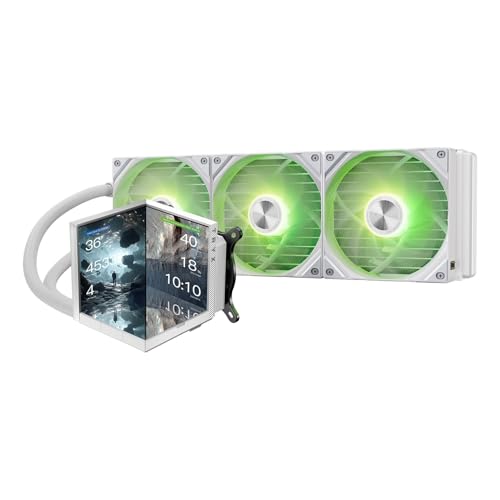
TRYX Stage 360mm AIO with Dual 4-inch Screens
Best for: Users wanting interactive CPU block displays
- Radiator Size
- 360mm
- Socket Compatibility
- LGA 1851/1700, AM5/AM4
- Display Size
- 4.0"
- Display Resolution
- 720×720
- Thermal Capacity
- 280W TDP
- Lighting Type
- ARGB
View on Amazon: TRYX Stage 360mm AIO with Dual 4-inch Screens Affiliate link
The TRYX Stage AIO Cooler 360mm features a 4.0-inch dual IPS screen with 720x720 resolution. It uses an Asetek 7th Gen V2 pump rated for 280W TDP. The unit includes three 120mm ROTA SL ARGB fans with pogo-pin connections. It supports LGA 1851 and AM5 sockets. This cooler suits users who want real-time system monitoring and interactive visuals on their CPU block.
Pros
- 4.0-inch dual IPS screen with 720x720 resolution
- Asetek 7th Gen V2 pump rated for 280W TDP
- Three 120mm ROTA SL ARGB fans with single-cable management
- Native GIPHY integration via KANALI software
- Supports Mirror, Split-Screen, and Extended display modes
Cons
- Screen warranty is only 3 years, while the AIO is 6 years
- Requires KANALI software for full functionality and GIPHY access
- Heavier at 4.95 pounds compared to standard 360mm coolers
Good fit if
- You want to display live system stats or GIFs on your CPU block
- You are building with Intel LGA 1851 or AMD AM5 sockets
- You prefer pre-installed fans with pogo-pin connections for easier cable management
Skip if
- You need a screen warranty that matches the full AIO warranty period
- You want to avoid installing additional software like KANALI for display control
- You prefer a lighter cooler under 4.5 pounds for easier mounting
Verdict: The TRYX Stage AIO Cooler 360mm fits users who want interactive visuals and real-time monitoring via its 4.0-inch dual IPS screen. It is a strong option for high-TDP builds on LGA 1851 or AM5 platforms who value display customization.
Specifications side by side
| Spec | TRYX Panorama 360 ARGB AMOLED AIO | TRYX Stage 360mm AIO with Dual 4-inch Screens |
|---|---|---|
| Radiator Size | 360mm | 360mm |
| Socket Compatibility | Intel LGA 1700/1200/115X AMD AM5/AM4 | LGA 1851/1700, AM5/AM4 |
| Display Size | 6.67" | 4.0" |
| Display Resolution | 2K | 720×720 |
| Thermal Capacity | 320W TDP | 280W TDP |
| Lighting Type | ARGB | ARGB |
| Lighting | ARGB | not stated |
| Dimensions | 16.2 × 8.3 × 5.9 inches | 17.2 × 7.68 × 5.51 inches |
| Weight | not stated | 5.2 pounds |
| Size | 360 mm (2024) | not stated |
| Color | P360A BK | White |
| Model | L-P360A-AS3M-G0K | L-S360A-DM3M-G0W |
Frequently asked questions
Which TRYX cooler has a larger display screen?
The TRYX Panorama 360 ARGB AIO has the larger screen. It features a single 6.67-inch curved AMOLED display. The Stage model uses two smaller 4-inch IPS screens. If you prefer a wide, immersive view, the Panorama is the better choice for visual impact.
Do both coolers support the same CPU sockets?
The Panorama explicitly lists compatibility with AM4, AM5, and LGA 1700. The Stage data does not specify its socket list in the provided specs. You should verify the Stage’s compatibility with your specific motherboard before purchasing to ensure a proper fit.
What type of lighting do these AIOs use?
Both the Panorama and Stage models utilize ARGB lighting. This allows you to sync colors with other compatible components. The TRYX KANALI software controls these effects. You can customize the patterns and brightness to match your system’s aesthetic preferences.
How do the physical dimensions of the radiators compare?
The Stage radiator is slightly larger in width and length. It measures 8.7 inches wide and 17.7 inches long. The Panorama is 8.3 inches wide and 16.2 inches long. Check your case compatibility to ensure the larger Stage unit fits in your chassis.
Which model is better for high-TDP builds?
The Panorama is rated for a 320W TDP. This supports high-performance processors. The Stage data does not list a specific TDP rating. You may need to check other sources for the Stage’s thermal limits if you are building a very powerful system.
Can I control both coolers with the same software?
Yes, both units use the TRYX KANALI software. This allows you to manage lighting and display settings from one place. You can update firmware and customize visuals for either model using this unified control panel.
Which cooler is heavier?
The TRYX Stage model lists a weight of 4.95 pounds. The Panorama data does not provide a weight specification. The Stage’s dual-screen setup likely contributes to this mass. Ensure your case can support the weight without sagging.